Yep!

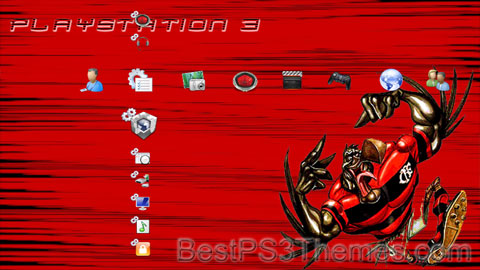
Yep! theme by NCNemesis

Download: Yep.p3t

Yep! Theme
(1 background)

"Yep!"
Single by Duane Eddy
from the album Especially for You
B-side"Three-30-Blues"
ReleasedMarch 1959
GenreRockabilly
Length2:04
LabelJamie
Songwriter(s)Duane Eddy, Lee Hazlewood
Producer(s)Lee Hazlewood, Lester Sill
Duane Eddy singles chronology
"Peter Gunn"
(1959)
"Yep!"
(1959)
"Forty Miles of Bad Road"
(1959)

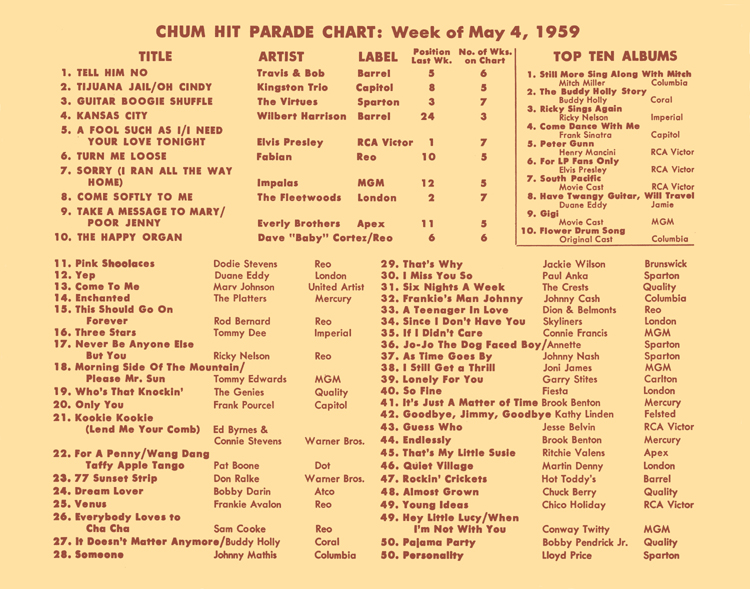
"Yep!" is a song written by Duane Eddy and Lee Hazlewood and performed by Eddy. The song reached #12 on the Canadian charts, #17 on the UK Singles Chart, and #30 on the Billboard Hot 100 in 1959.[1][2] The song appeared on his 1959 album, Especially for You.[3]

The song was produced by Lee Hazlewood and Lester Sill.[4]

Other versions[edit]

References[edit]

  1. ^ "CHUM Hit Parade - May 4, 1959".
  2. ^ Duane Eddy, "Yep!" Chart Positions Retrieved April 26, 2014
  3. ^ Duane Eddy, Especially for You Retrieved April 26, 2014
  4. ^ Duane Eddy, "Yep!" single release Retrieved April 26, 2014
  5. ^ The Surfaris, "Yep!" EP release Retrieved April 26, 2014

PS3 Magic

PS3 Magic theme by Javier Pineda

Download: PS3Magic.p3t

PS3 Magic Theme
(4 backgrounds)

P3T Unpacker v0.12
Copyright (c) 2007. Anoop Menon

This program unpacks Playstation 3 Theme files (.p3t) so that you can touch-up an existing theme to your likings or use a certain wallpaper from it (as many themes have multiple). But remember, if you use content from another theme and release it, be sure to give credit!

Download for Windows: p3textractor.zip

Instructions:

Download p3textractor.zip from above. Extract the files to a folder with a program such as WinZip or WinRAR. Now there are multiple ways to extract the theme.

The first way is to simply open the p3t file with p3textractor.exe. If you don’t know how to do this, right click the p3t file and select Open With. Alternatively, open the p3t file and it will ask you to select a program to open with. Click Browse and find p3textractor.exe from where you previously extracted it to. It will open CMD and extract the theme to extracted.[filename]. After that, all you need to do for any future p3t files is open them and it will extract.

The second way is very simple. Just drag the p3t file to p3textractor.exe. It will open CMD and extract the theme to extracted.[filename].

For the third way, first put the p3t file you want to extract into the same folder as p3textractor.exe. Open CMD and browse to the folder with p3extractor.exe. Enter the following:
p3textractor filename.p3t [destination path]Replace filename with the name of the p3t file, and replace [destination path] with the name of the folder you want the files to be extracted to. A destination path is not required. By default it will extract to extracted.filename.

bouuuhhh

bouuuhhh theme by tenshi

Download: bouuuhhh.p3t

bouuuhhh Theme
(1 background)

P3T Unpacker v0.12
Copyright (c) 2007. Anoop Menon

This program unpacks Playstation 3 Theme files (.p3t) so that you can touch-up an existing theme to your likings or use a certain wallpaper from it (as many themes have multiple). But remember, if you use content from another theme and release it, be sure to give credit!

Download for Windows: p3textractor.zip

Instructions:

Download p3textractor.zip from above. Extract the files to a folder with a program such as WinZip or WinRAR. Now there are multiple ways to extract the theme.

The first way is to simply open the p3t file with p3textractor.exe. If you don’t know how to do this, right click the p3t file and select Open With. Alternatively, open the p3t file and it will ask you to select a program to open with. Click Browse and find p3textractor.exe from where you previously extracted it to. It will open CMD and extract the theme to extracted.[filename]. After that, all you need to do for any future p3t files is open them and it will extract.

The second way is very simple. Just drag the p3t file to p3textractor.exe. It will open CMD and extract the theme to extracted.[filename].

For the third way, first put the p3t file you want to extract into the same folder as p3textractor.exe. Open CMD and browse to the folder with p3extractor.exe. Enter the following:
p3textractor filename.p3t [destination path]Replace filename with the name of the p3t file, and replace [destination path] with the name of the folder you want the files to be extracted to. A destination path is not required. By default it will extract to extracted.filename.

Corey #2

Corey theme by slim502

Download: Corey_2.p3t

Corey Theme 2
(1 background, different for HD and SD)

Corey
GenderMale
Language(s)Greek, Gaelic, Latin
Other names
Related namesCory, Cora, Coire, Corie, Corrie, Curry (surname), Correy, Cori, Kory (given name), Khouri, Kori, Korie, Corrado

Corey is a masculine given name and a surname. It is a masculine version of name Cora, which has Greek origins and is the maiden name of the goddess Persephone. The name also can have origins from the Gaelic word coire, which means "in a cauldron" or "in a hollow".[1]

As a surname, it has a number of possible derivations, including an Old Norse personal name Kori of uncertain meaning, which is found in Scandinavia and England, often meaning curly haired. As an Irish surname it comes from Ó Comhraidhe (descendant of Comhraidheh). Notable people or fictional characters named Corey include:

First name[edit]

A[edit]

B[edit]

C[edit]

D[edit]

E[edit]

F[edit]

G[edit]

H[edit]

I[edit]

  • Corey Ivy (born 1977), American football player

J[edit]

K[edit]

L[edit]

M[edit]

N[edit]

O[edit]

P[edit]

R[edit]

S[edit]

T[edit]

V[edit]

W[edit]

Y[edit]

Surname[edit]

Fictional characters[edit]

  • Corey Riffin, a character from Canadian animated TV series Grojband

See also[edit]

Footnotes[edit]

  1. ^ "Cory Name Meaning & Origin". Baby Name Wizard. Retrieved 2019-11-25.

Corey

Corey theme by slim502

Download: Corey.p3t

Corey Theme
(1 background, different for HD and SD)

Corey
GenderMale
Language(s)Greek, Gaelic, Latin
Other names
Related namesCory, Cora, Coire, Corie, Corrie, Curry (surname), Correy, Cori, Kory (given name), Khouri, Kori, Korie, Corrado

Corey is a masculine given name and a surname. It is a masculine version of name Cora, which has Greek origins and is the maiden name of the goddess Persephone. The name also can have origins from the Gaelic word coire, which means "in a cauldron" or "in a hollow".[1]

As a surname, it has a number of possible derivations, including an Old Norse personal name Kori of uncertain meaning, which is found in Scandinavia and England, often meaning curly haired. As an Irish surname it comes from Ó Comhraidhe (descendant of Comhraidheh). Notable people or fictional characters named Corey include:

First name[edit]

A[edit]

B[edit]

C[edit]

D[edit]

E[edit]

F[edit]

G[edit]

H[edit]

I[edit]

  • Corey Ivy (born 1977), American football player

J[edit]

K[edit]

L[edit]

M[edit]

N[edit]

O[edit]

P[edit]

R[edit]

S[edit]

T[edit]

V[edit]

W[edit]

Y[edit]

Surname[edit]

Fictional characters[edit]

  • Corey Riffin, a character from Canadian animated TV series Grojband

See also[edit]

Footnotes[edit]

  1. ^ "Cory Name Meaning & Origin". Baby Name Wizard. Retrieved 2019-11-25.

The Marks

The Marks theme by weisoli57

Download: TheMarks.p3t

The Marks Theme
(9 backgrounds)

P3T Unpacker v0.12
Copyright (c) 2007. Anoop Menon

This program unpacks Playstation 3 Theme files (.p3t) so that you can touch-up an existing theme to your likings or use a certain wallpaper from it (as many themes have multiple). But remember, if you use content from another theme and release it, be sure to give credit!

Download for Windows: p3textractor.zip

Instructions:

Download p3textractor.zip from above. Extract the files to a folder with a program such as WinZip or WinRAR. Now there are multiple ways to extract the theme.

The first way is to simply open the p3t file with p3textractor.exe. If you don’t know how to do this, right click the p3t file and select Open With. Alternatively, open the p3t file and it will ask you to select a program to open with. Click Browse and find p3textractor.exe from where you previously extracted it to. It will open CMD and extract the theme to extracted.[filename]. After that, all you need to do for any future p3t files is open them and it will extract.

The second way is very simple. Just drag the p3t file to p3textractor.exe. It will open CMD and extract the theme to extracted.[filename].

For the third way, first put the p3t file you want to extract into the same folder as p3textractor.exe. Open CMD and browse to the folder with p3extractor.exe. Enter the following:
p3textractor filename.p3t [destination path]Replace filename with the name of the p3t file, and replace [destination path] with the name of the folder you want the files to be extracted to. A destination path is not required. By default it will extract to extracted.filename.

PS3 Roses

PS3 Roses theme by HotPixelUS

Download: PS3Roses.p3t

PS3 Roses Theme
(2 backgrounds)

P3T Unpacker v0.12
Copyright (c) 2007. Anoop Menon

This program unpacks Playstation 3 Theme files (.p3t) so that you can touch-up an existing theme to your likings or use a certain wallpaper from it (as many themes have multiple). But remember, if you use content from another theme and release it, be sure to give credit!

Download for Windows: p3textractor.zip

Instructions:

Download p3textractor.zip from above. Extract the files to a folder with a program such as WinZip or WinRAR. Now there are multiple ways to extract the theme.

The first way is to simply open the p3t file with p3textractor.exe. If you don’t know how to do this, right click the p3t file and select Open With. Alternatively, open the p3t file and it will ask you to select a program to open with. Click Browse and find p3textractor.exe from where you previously extracted it to. It will open CMD and extract the theme to extracted.[filename]. After that, all you need to do for any future p3t files is open them and it will extract.

The second way is very simple. Just drag the p3t file to p3textractor.exe. It will open CMD and extract the theme to extracted.[filename].

For the third way, first put the p3t file you want to extract into the same folder as p3textractor.exe. Open CMD and browse to the folder with p3extractor.exe. Enter the following:
p3textractor filename.p3t [destination path]Replace filename with the name of the p3t file, and replace [destination path] with the name of the folder you want the files to be extracted to. A destination path is not required. By default it will extract to extracted.filename.

Nowloaded

Nowloaded theme by Duff_1980

Download: Nowloaded.p3t

Nowloaded Theme
(1 background)

P3T Unpacker v0.12
Copyright (c) 2007. Anoop Menon

This program unpacks Playstation 3 Theme files (.p3t) so that you can touch-up an existing theme to your likings or use a certain wallpaper from it (as many themes have multiple). But remember, if you use content from another theme and release it, be sure to give credit!

Download for Windows: p3textractor.zip

Instructions:

Download p3textractor.zip from above. Extract the files to a folder with a program such as WinZip or WinRAR. Now there are multiple ways to extract the theme.

The first way is to simply open the p3t file with p3textractor.exe. If you don’t know how to do this, right click the p3t file and select Open With. Alternatively, open the p3t file and it will ask you to select a program to open with. Click Browse and find p3textractor.exe from where you previously extracted it to. It will open CMD and extract the theme to extracted.[filename]. After that, all you need to do for any future p3t files is open them and it will extract.

The second way is very simple. Just drag the p3t file to p3textractor.exe. It will open CMD and extract the theme to extracted.[filename].

For the third way, first put the p3t file you want to extract into the same folder as p3textractor.exe. Open CMD and browse to the folder with p3extractor.exe. Enter the following:
p3textractor filename.p3t [destination path]Replace filename with the name of the p3t file, and replace [destination path] with the name of the folder you want the files to be extracted to. A destination path is not required. By default it will extract to extracted.filename.

Weed Jr

Weed Jr theme by unknown

Download: WeedJr.p3t

Weed Jr Theme
(1 background)

P3T Unpacker v0.12
Copyright (c) 2007. Anoop Menon

This program unpacks Playstation 3 Theme files (.p3t) so that you can touch-up an existing theme to your likings or use a certain wallpaper from it (as many themes have multiple). But remember, if you use content from another theme and release it, be sure to give credit!

Download for Windows: p3textractor.zip

Instructions:

Download p3textractor.zip from above. Extract the files to a folder with a program such as WinZip or WinRAR. Now there are multiple ways to extract the theme.

The first way is to simply open the p3t file with p3textractor.exe. If you don’t know how to do this, right click the p3t file and select Open With. Alternatively, open the p3t file and it will ask you to select a program to open with. Click Browse and find p3textractor.exe from where you previously extracted it to. It will open CMD and extract the theme to extracted.[filename]. After that, all you need to do for any future p3t files is open them and it will extract.

The second way is very simple. Just drag the p3t file to p3textractor.exe. It will open CMD and extract the theme to extracted.[filename].

For the third way, first put the p3t file you want to extract into the same folder as p3textractor.exe. Open CMD and browse to the folder with p3extractor.exe. Enter the following:
p3textractor filename.p3t [destination path]Replace filename with the name of the p3t file, and replace [destination path] with the name of the folder you want the files to be extracted to. A destination path is not required. By default it will extract to extracted.filename.